The second
see what's left. before, not after.
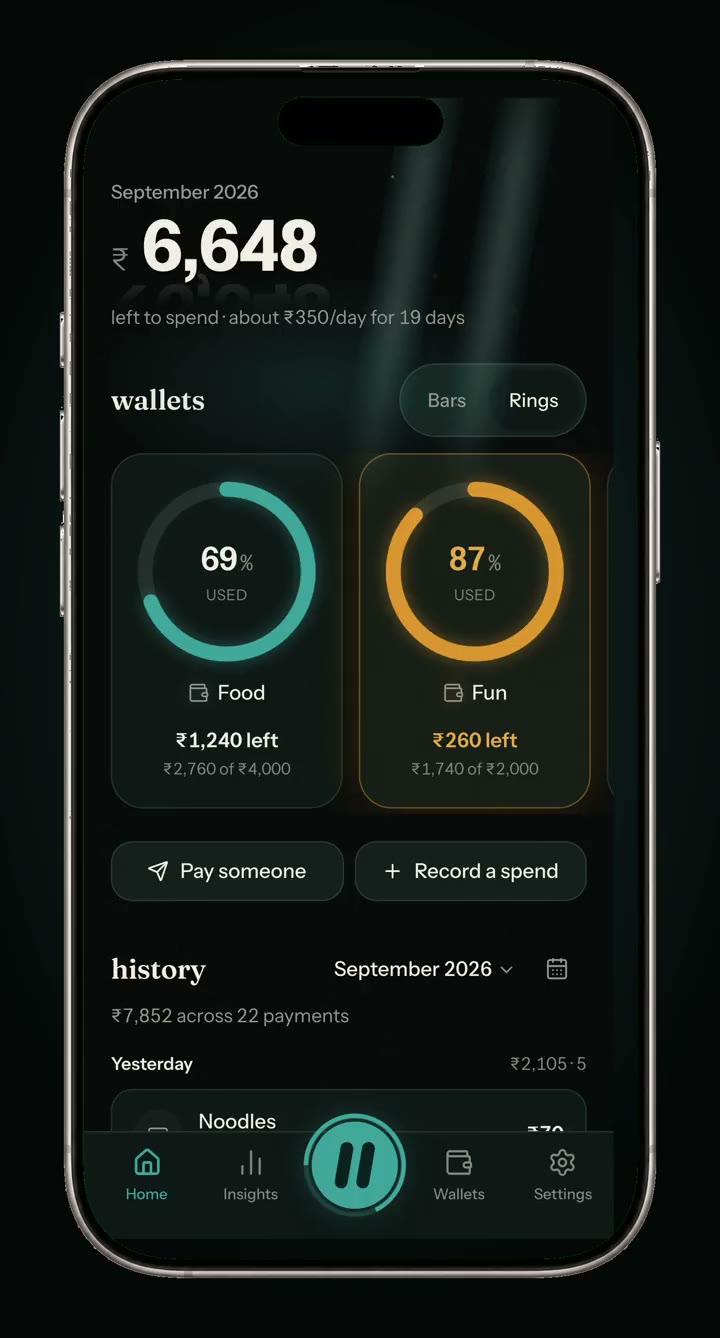
Dhyan Pay puts one second between you and GPay — long enough to see what's left before it leaves. You still pay where you always pay.
One month, unnoticed
₹3,24043 payments under ₹100. chai, autos, one more delivery.
The product, in three lights
The second
see what's left. before, not after.
The warning
at 80%, it speaks. it never shouts.
nothing below 80% earns a sound.
The override
pay anyway. it's a button, not a fight.
overrides get counted, not punished.
one second is all we ask.
press & hold
Dhyan Pay
GPay · PhonePe · Paytm · CRED
the actual payment happens in GPay, PhonePe, Paytm or CRED, under your own PIN. that handoff is why it can't touch your money — and why no banking licence applies.
yes, even CRED.
Android will offer to add it to your home screen. If it doesn't, use the browser menu and tap Install app.
It's built for a phone — open this page on your Android phone or iPhone. Or have a look around from here.
01it never touches your money
02it never reads your SMS
03it warns, it never blocks
04amber means 80%, clay means over, nothing else gets a colour
No. It never holds or moves money, and it can't — every payment happens inside GPay, PhonePe, Paytm or CRED. Dhyan Pay opens them with the amount filled in, and waits.
Because it can't see your bank, by design. One tap after you pay is the price of an app that never asks for access to your money.
Nothing. Nothing in it is priced or sold, and no ads run inside it — it's a personal tool made by one person. Shared wallets are switched on by invitation while they're being tested, and those cost nothing either.
Settings has a one-tap CSV export and a delete button that removes everything for good. No retention period, no recovery, no questions.

Takes about ten seconds.
Installing is what makes the pause work: it opens instantly, keeps your wallets available without a signal, and is the only way iPhone allows reminders. Nothing is downloaded from an app store.
Open in the browser instead