You're in an in-app browser. Tap ⋯ and choose "Open in Chrome" or "Open in Safari" — adding Dhyan Pay to your home screen doesn't work in here.
Dhyan Pay

You already have a payments app. This is the second before you open it.

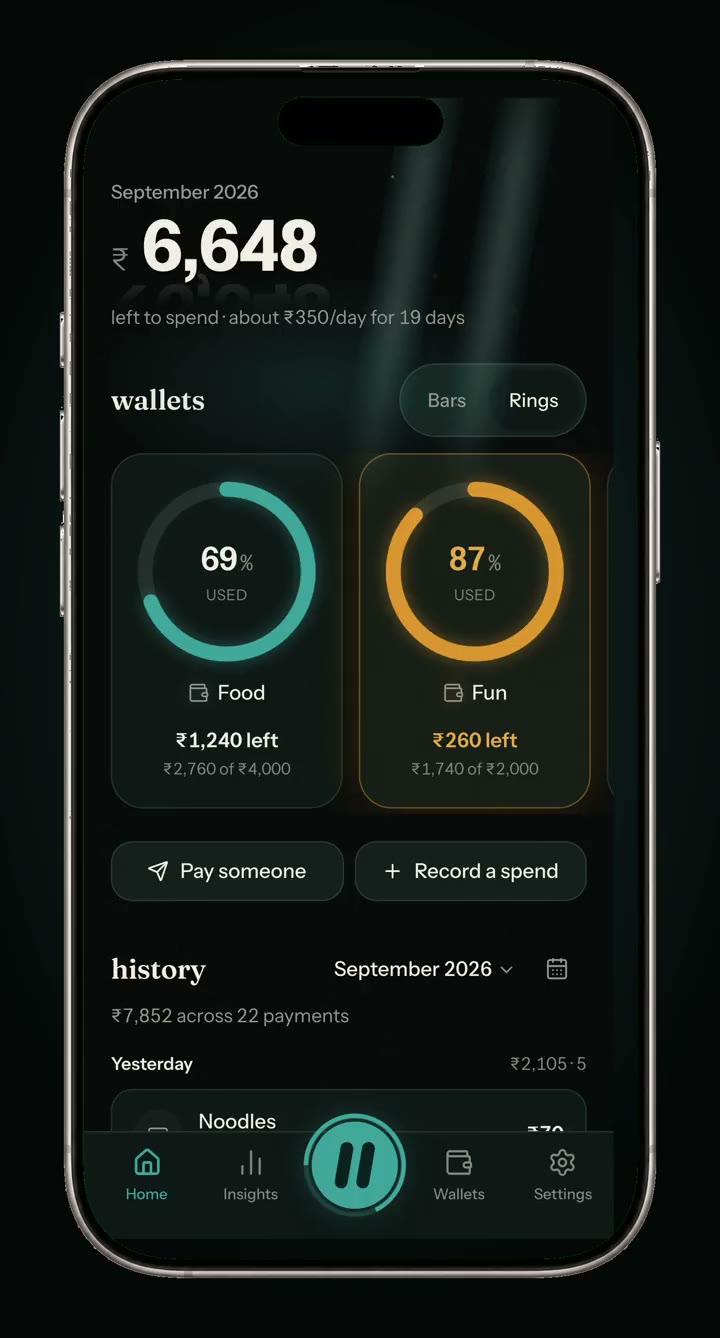
Dhyan Pay sorts your spending into wallets. You still pay with GPay, PhonePe or Paytm — this keeps score.

Why it exists

Forty small payments a month feel like nothing, and add up to everything.

A fairly ordinary month, ₹100 and under

43 payments · ₹3,240 Chai, autos, a parcel, one more coffee. None of them felt like a decision.

Nothing here is going to shame you about it. The app just counts them while they're happening, instead of on the 30th when the money is gone.

How it works

It sits on top of the apps you already pay with.

It doesn't replace GPay or PhonePe, and it never asks for your bank. It goes first, then hands you over.

  1. 1

    Open Dhyan Pay, not GPay

    Scan the same QR you were going to scan anyway, or type an amount you already spent.

  2. 2

    Pick the wallet

    It shows what that payment does before you make it — "Food: ₹1,240 → ₹1,200 after this."

  3. 3

    Pay where you always did

    One tap hands you to GPay, PhonePe, Paytm or CRED with the amount already filled in.

  4. 4

    Confirm it went through

    Come back, tap yes, and the wallet updates. Forget, and it nudges you once.

The trade

Yes, it's more taps than just opening GPay. That's the point.

The pause is where the decision happens. A payment you had to think about for one second is a payment you'll remember making, and the second is the entire difference between a budget you read and a budget you use.

A week in, you'll know where your money goes instead of guessing at the end of the month.

What it never touches

It cannot move your money, by design.

  • It never sees your bank account, your balance, or your UPI PIN. There is nothing to link.
  • Every payment happens inside your real UPI app. Dhyan Pay hands you over and waits.
  • It never reads your SMS. That's the usual shortcut for tracking payments, and it's the one thing that turns a boring app into a frightening one.
  • The UPI IDs of people you pay are never stored as written — only as a one-way fingerprint, so a familiar shop can suggest its usual wallet.

This is also why no banking licence applies to it. It isn't a payments company and never will be. It's a notebook that opens at the right moment.

Wallets

Limits that bend, and a month that starts when yours does.

Soft limits, never blocks

Cross a limit and you get one calm screen with the real numbers, and a normal button to carry on. It counts the override instead of stopping you.

Your month, not the calendar's

Start the cycle on any day from 1 to 31. Paid on the 25th? Budget runs payday to payday.

A fair first month

Join halfway through and it scales the first cycle to the days actually left, then goes to full limits on your next start date.

Move budget around

Give Fun some of Food's room this month without changing either limit permanently.

Alerts

One permission, and you decide what it actually does.

Nothing fires below 80% of a limit, and never more than one budget nudge a day — alerts you see daily stop meaning anything. You can also choose a silent count on the app icon and no notifications at all.

Honest limits

You confirm payments yourself. That isn't a gap.

Dhyan Pay can't see whether a payment succeeded, so it asks. Most apps solve that by reading your SMS or connecting to your bank; doing that would remove the one second this whole app exists to create, and hand a stranger your statement to save you a tap.

So: one tap after you pay. That's the deal, and it's deliberate.

Get it

It installs from your browser. There's no app store.

On your iPhone, open the app and add it to your home screen:

  1. Tap Open Dhyan Pay below — it works in Safari straight away.
  2. Tap the Share button at the bottom of Safari.
  3. Scroll down and tap Add to Home Screen, then Add.

You can try it in the browser first. Alerts need it on the home screen.

On Android, open the app and it will offer to add itself to your home screen. If it doesn't, use your browser menu and tap Install app.

It's built for a phone. Open this page on your Android phone or iPhone, or just open the app below to have a look around.

Who made it

Made by Hari, for about six people.

It's free. There are no ads, nothing is sold, and there's no company behind it. If something's broken or wrong, there's a real person at the other end of the contact page.